Saturday, March 26, 2011

Know More About Secure Sockets Layer (SSL)

Secure Sockets Layer (SSL) is the most widely used technology for providing a secure communication between the web client and the web server. Most of us are familiar with many sites such as Gmail, Yahoo etc. using https protocol in their login pages. When we see this, we may wonder what’s the difference between http and https. In simple words HTTP protocol is used for standard communication between the Web server and the client. HTTPS is used for a SECURE communication.

What exactly is Secure Communication ?

Suppose there exists two communication parties A (client) and B (server).
Working of HTTP
When A sends a message to B, the message is sent as a plain text in an unencrypted manner. This is acceptable in normal situations where the messages exchanged are not confidential. But imagine a situation where A sends a PASSWORD to B. In this case, the password is also sent as a plain text. This has a serious security problem because, if an intruder (hacker) can gain unauthorised access to the ongoing communication between A andB , he can see the PASSWORDS since they remain unencrypted. This scenario is illustrated using the following figure
Now lets see the working of HTTPS
When A sends a PASSWORD (say “mypass“) to B, the message is sent in an encrypted format. The encrypted message is decrypted on B‘s side. So even if the Hacker gains an unauthorised access to the ongoing communication between A and he gets only the encrypted password (“xz54p6kd“) and not the original password. This is shown below

How is HTTPS implemented ?

HTTPS is implemented using Secure Sockets Layer (SSL). A website can implement HTTPS by purchasing an SSL Certificate. Secure Sockets Layer (SSL) technology protects a Web site and makes it easy for the Web site visitors to trust it. It has the following uses
  1. An SSL Certificate enables encryption of sensitive information during online transactions.
  2. Each SSL Certificate contains unique, authenticated information about the certificate owner.
  3. A Certificate Authority verifies the identity of the certificate owner when it is issued.
How Encryption Works ?
Each SSL Certificate consists of a Public key and a Private key. The public key is used to encrypt the information and the private key is used to decrypt it. When your browser connects to a secure domain, the server sends a Public key to the browser to perform the encryption. The public key is made available to every one but the private key(used for decryption) is kept secret. So during a secure communication, the browser encrypts the message using the public key and sends it to the server. The message is decrypted on the server side using the Private key(Secret key).
How to identify a Secure Connection ?
In Internet Explorer, you will see a lock icon Picture of the Lock icon in the Security Status bar. The Security Status bar is located on the right side of the Address bar. You can click the lock to view the identity of the website.
In high-security browsers, the authenticated organization name is prominently displayed and the address bar turns GREEN when an Extended Validation SSL Certificate is detected. If the information does not match or the certificate has expired, the browser displays an error message or warning and the status bar may turn RED.
So the bottom line is, whenever you perform an online transaction such as Credit card payment, Bank login or Email login always ensure that you have a secure communication. A secure communication is a must in these situations. Otherwise there are chances of Phishing using a Fake login Page.

How to Make a Trojan Horse

How to Make a Trojan
Most of you may be curious to know about how to make a Trojan or Virus on your own. Here is an answer for your curiosity. In this post I’ll show you how to make a simple Trojan on your own using C programming language. This Trojan when executed will eat up the hard disk space on the root drive (The drive on which Windows is installed, usually C: Drive) of the computer on which it is run. Also this Trojan works pretty quickly and is capable of eating up approximately 1 GB of hard disk space for every minute it is run. So, I’ll call this as Space Eater Trojan. Since this Trojan is written using a high level programming language it is often undetected by antivirus. The source code for this Trojan is available for download at the end of this post. Let’s see how this Trojan works…
Before I move to explain the features of this Trojan you need to know what exactly is a Trojan horse and how it works. As most of us think a Trojan or a Trojan horse is not a virus. In simple words a Trojan horse is a program that appears to perform a desirable function but in fact performs undisclosed malicious functions that allow unauthorized access to the host machine or create a damage to the computer.
 
Now lets move to the working of our Trojan
The Trojan horse which I have made appears itself as an antivirus program that scans the computer and removes the threats. But in reality it does nothing but occupy the hard disk space on the root drive by just filling it up with a huge junk file. The rate at which it fills up the hard disk space it too high. As a result the the disk gets filled up to 100% with in minutes of running this Trojan. Once the disk space is full, the Trojan reports that the scan is complete. The victim will not be able to clean up the hard disk space using any cleanup program. This is because the Trojan intelligently creates a huge file in the Windows\System32 folder with the.dll extension. Since the junk file has the .dll extention it is often ignored by disk cleanup softwares. So for the victim, there is now way to recover the hard disk space unless reformatting his drive.
 
The algorithm of the Trojan is as follows
1. Search for the root drive
2. Navigate to WindowsSystem32 on the root drive
3. Create the file named “spceshot.dll
4. Start dumping the junk data onto the above file and keep increasing it’s size until the drive is full
5. Once the drive is full, stop the process.
You can download the Trojan source code HERE. Please note that I have not included the executabe for security reasons. You need to compile it to obtain the executable.
 

How to compile, test and remove the damage?

 
Testing:
To test the Trojan,  just run the SpaceEater.exe file on your computer. It’ll generate a warning message at the beginning. Once you accept it, the Trojan runs and eats up hard disk space.
NOTE: To remove the warning message you’ve to edit the source code and then re-compile it.
 
How to remove the Damage and free up the space?
To remove the damage and free up the space, just type the following in the “run” dialog box.
%systemroot%\system32
Now search for the file “spceshot.dll“. Just delete it and you’re done. No need to re-format the hard disk.
 NOTE: You can also change the ICON of the virus to make it look like a legitimate program. This method is described in the post: How to Change the ICON of an EXE file ?
Please pass your comments and tell me your opinion. I am just waiting for your comments…
Thanks to srikanth

How Antivirus Software Works

How antivirus worksDue to ever increasing threat from virus and other malicious programs, almost every computer today comes with a pre-installed antivirus software on it. In fact, an antivirus has become one of the most essential software package for every computer. Even though every one of us have an antivirus software installed on our computers, only a few really bother to understand how it actually works! Well if you are one among those few who would really bother to understand how an antivirus works, then this article is for you.

How Antivirus Works

An antivirus software typically uses a variety of strategies in detecting and removing viruses, worms and other malware programs. The following are the two most widely employed identification methods:

1. Signature-based dectection (Dictionary approach)

This is the most commonly employed method which involves searching for known patterns of virus within a given file. Every antivirus software will have a dictionary of sample malware codes called signatures in it’s database. Whenever a file is examined, the antivirus refers to the dictionary of sample codes present within it’s database and compares the same with the current file. If the piece of code within the file matches with the one in it’s dictionary then it is flagged and proper action is taken immediately so as to stop the virus from further replicating. The antivirus may choose to repair the file, quarantine or delete it permanently based on it’s potential risk. 
As new viruses and malwares are created and released every day, this method of detection cannot defend against new malwares unless their samples are collected and signatures are released by the antivirus software company. Some companies may also encourage the users to upload new viruses or variants, so that the virus can be analyzed and the signature can be added to the dictionary.
Signature based detection can be very effective, but requires frequent updates of the virus signature dictionary. Hence the users must update their antivirus software on a regular basis so as to defend against new threats that are released daily.

2. Heuristic-based detection (Suspicious behaviour approach)

Heuristic-based detection involves identifying suspicious behaviour from any given program which might indicate a potential risk. This approach is used by some of the sophisticated antivirus softwares to identify new malware and variants of known malware. Unlike the signature based approach, here the antivirus doesn’t attempt to identify known viruses, but instead monitors the behavior of all programs.
For example, malicious behaviours like a program trying to write data to an executable program is flagged and the user is alerted about this action. This method of detection gives an additional level of security from unidentified threats.
File emulation: This is another type of heuristic-based approach where a given program is executed in a virtual environment and the actions performed by it are logged. Based on the actions logged, the antivirus software can determine if the program is malicious or not and carry out necessary actions in order to clean the infection.
Most commercial antivirus softwares use a combination of both signature-based and heuristic-based approaches to combat malware.

Issues of concern

Zero-day threats: A zero-day (zero-hour ) threat or attack is where a malware tries to exploit computer application vulnerabilities that are yet unidentified by the antivirus software companies. These attacks are used to cause damage to the computer even before they are identified. Since patches are not yet released for these kind of new threats, they can easily manage to bypass the antivirus software and carry out malicious actions. However most of the threats are identified after a day or two of it’s release, but damage caused by them before identification is quite inevitable.
Daily Updates: Since new viruses and threats are released everyday, it is most essential to update the antivirus software so as to keep the virus definitions up-to-date. Most softwares will have an auto-update feature so that the virus definitions are updated whenever the computer is connected to the Internet.
Effectiveness: Even though an antivirus software can catch almost every malware, it is still not 100% foolproof against all kinds of threats. As explained earlier, a zero-day threat can easily bypass the protective shield of the antivirus software. Also virus authors have tried to stay a step ahead by writing “oligomorphic“, “polymorphic” and, more recently, “metamorphic” virus codes, which will encrypt parts of themselves or otherwise modify themselves as a method of disguise, so as to not match virus signatures in the dictionary.
Thus user education is as important as antivirus software; users must be trained to practice safe surfing habits such as downloading files only from trusted websites and not blindly executing a program that is unknown or obtained from an untrusted source.
Thanks to srikanth

How to Change the ICON of an EXE file

Some times it becomes necessary to change the ICON of an executable (.exe) file so that the exe file get’s a new appearence. Many of the Tools such as TuneUP Winstyler does this job by adjusting the Windows to display a custom icon to the user. But in reality when the file is carried to a different computer, then it shows it’s original ICON itself. This means that inorder to permanantly change the ICON, it is necessary to modify the executable file and embed the ICON inside the file itself. Now when this is done the exe file’s ICON is changed permanantly so that even if you take file to a different computer it show’s a new icon.
For this purpose I have found a nice tool which modifies the exe file and will embed the ICON of your choice into the file itself. ie: The tool changes the exe ICON permanantly.
I’ll give you a step-by-step instruction on how to use this tool to change the icon.
1. Goto www.shelllabs.com and download the trial version of Icon Changer and install it (Works on both XP and Vista).
2. Right-click on the exe file whose ICON is to be changed.
3. Now you will see the option Change Icon. Click on that option.
4. Now the Icon Changer program will open up.
5. Icon changer will search for all the ICONS on your system so that you can select any one of those.
6. Now select the ICON of your choice and click on SET.
7. Now a popup window will appear and ask you to select from either of these two options.
  • Change embeded icon.
  • Adjust Windows to display custom icon.
Select the first option (Change embeded icon).
8. You are done. The ICON get’s changed.

Friday, March 25, 2011

Download 1500+ Proxy Server's List | All tested and Working Free Proxy Servers

.As a hacker it is a must to keep your identity hidden,for doing so you need a very quick and smart tool called a proxy.


Download 1500+ Proxy Server's List | All tested and Working Free Proxy Servers


What is a Proxy Server ?

A proxy server which makes you view your desired webpages but not through your original IP.In short it just protects your IP from being revealed by the website for that matter.For ex. If my IP is "76.74.255.236",what that server does is that it loads the webpage through another IP say, "89.16.178.168" and keeps your IP being tracked/tapped.

List of Proxy Servers:

Here is a small list of proxy servers :

http://proxyhost.org
http://webproxy.dk
http://phproxy.frac.dk
http://phproxy.1go.dk
http://proxify.com
http://home.no.net/roughnex
http://nomorefilter.com
http://rapidwire.net
http://oproxy.info
http://stealth-ip.net
http://cooltunnell.com
http://schoolsurf.com
http://anonymouse.org
http://goodproxy.com
http://nomorefilter.com
http://openweblive.com


For the whole list you can just download it from here :

File Details:
Download: 1500+ Proxy List
Password: hackmeout.blogspot.com
File Size: 9 KB
File Extension: .rar (Compressed Archive)

How to use Rapidshare | Hotfile | Fileserve Premium Cookie ?

Most of the time you must have seen on my forums that members post what are called as "download free premium account cookies" rather than the account details.Before we get into how to use these premium cookies let us first have a look on what "Cookies" are ? ( Don't misunderstand them for cookies as in food..lol). What exactly do you mean by ?

Rapidshare Premium Cookie
Hotfile Premium Cookie
Fileserve Premium Cookie
Megaupload Premium Cookie
Filesonic Premium Cookie


What are Cookies ?

The website saves a complimentary file with a matching ID tag. In this file various information can be stored, from pages visited on the site, to information voluntarily given to the site. When you revisit the site days or weeks later, the site can recognize you by matching the cookie on your computer with the counterpart in its database.

In a nutshell: It is something that a website needs in order to identify and automatically log you into the site without asking for your account details again and again.

Anyway lets proceed on how exactly it is being used in hacking premium accounts such as Fileserve,Hotfile,Rapidshare,Depositfiles etc.

Where can i get a Premium Cookie ? 

You can always you the "Mulitple Search Engine Search" - Searchr.us or there are already tons of premium cookies on my Hackmeout Support Forums as well : Website Cracking & Hacking Forums

How to use Premium Cookies ?

Usually a hotfile cookie would look something like this :

00c8a3d907c96ebdd20ebfb9b079814f9f10dfde725893b503981ee9d74cf587

IMPORTANT: Before you use any of the cookies make sure you already create a free account in the site that your about to use.This is because the default cookies has to be generated.Just modify the OLD ones or DELETE the whole bunch of cookies related to that site and place just yours !

Method 1:


Tools Required :

1. Mozilla Firefox Browser : Mozilla Firefox

2.Cookie Editor (Add N Edit Cookies) Plugin for Firefox : https://addons.mozilla.org/en-US/firefox/addon/add-n-edit-cookies/

3.And you need a cookie such of hotfile.com or someother site for that matter.I'm using a hotfile cookie (00c8a3d907c96ebdd20ebfb9b079814f9f10dfde725893b503981ee9d74cf587) in this article

The Working: 

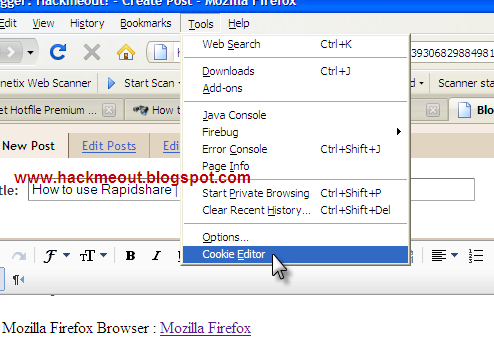
1. Start Firefox.Go to Tools > Cookie Editor


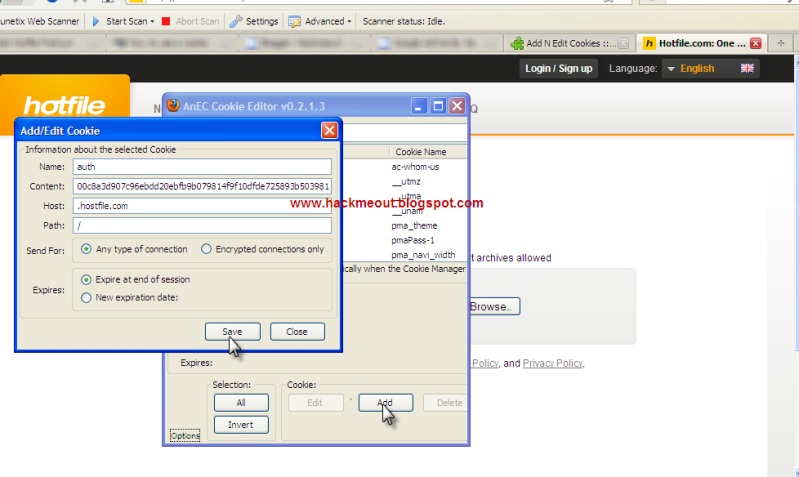
2. Once you go there you'll get a dialog box like this.Click on "Add".


3. And enter these details as in the picture above. NOTE: The details entered above are just for hotfile.com and not all sites such as rapidshare,megaupload etc..

Name: auth
Content: 00c8a3d907c96ebdd20ebfb9b079814f9f10dfde725893b503981ee9d74cf587 (Your Cookie)
Host: .hotfile.com
Path:  /

After you have enetered these details check once again to make sure you haven't made any mistake.Then click on "Save" and "Close" the Cookie Editor dialog box.

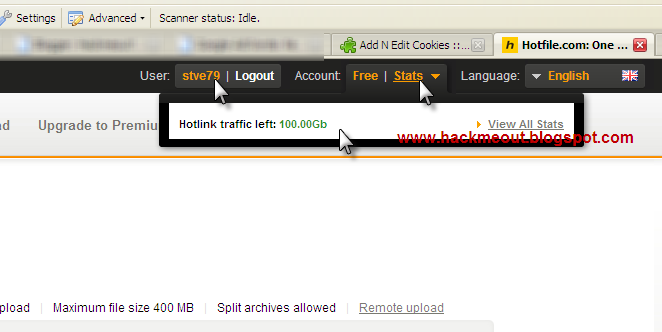
4.Once you have completed all the 4 above steps now just refresh the page ie.Refresh "http://hotfile.com" and you'll find that you have succesfully logged into your victim's account.If you still didn't get logged in,then refresh the page for about  more times and then it will be fine.

This is what it should look like once it's done.


Note: The above cookie details which i provided is JUST for Hotfile premium cookies.I'll tell you the details for other sites such as rapidshare,megauplad and fileserve below.

Details to be entered for various sites:

Hotfile.com :

Name: auth
Content: (Your Cookie)
Host: .hotfile.com
Path:  /

Fileserve.com :

Name: cookie
Content: (Your Cookie)
Host: .fileserve.com
Path:  /

Filesonic.com :

Name: PHPSESSID
Content: (Your Cookie)
Host: .fileserve.com
Path:  /

Rapidshare.com :

Name: enc
Content: (Your Cookie)
Host: .rapidshare.com
Path:  /

Megaupload.com :

Name: user
Content: (Your Cookie)
Host: .megaupload.com
Path:  /

Method 2:

Tools Required :

1. Google Chrome Browser: Download

2.Cookie Plugin for Chrome: Premium Cookie Injector 1.1


The Working:  

This plugin works only for

Fileserve.com
Hotfile.com
Rapidshare.com
Megaupload-Megavideo


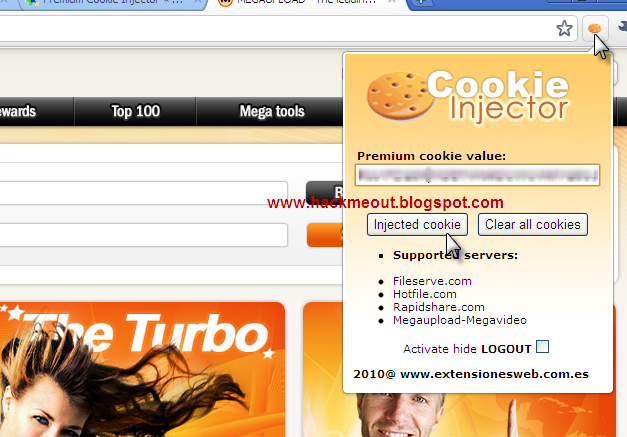
This is much easier than the first method as tis doesn't involve much of manual working.

1. Get a premium cookie for the above listed servers.Go to your server site.
2. Enter it in the space provided.
3. And then click "Inject Cookie".
4. The page will be automatically refreshed and the cookie will be injected.


If you have any doubts please post a comment below.Thanks for reading this article